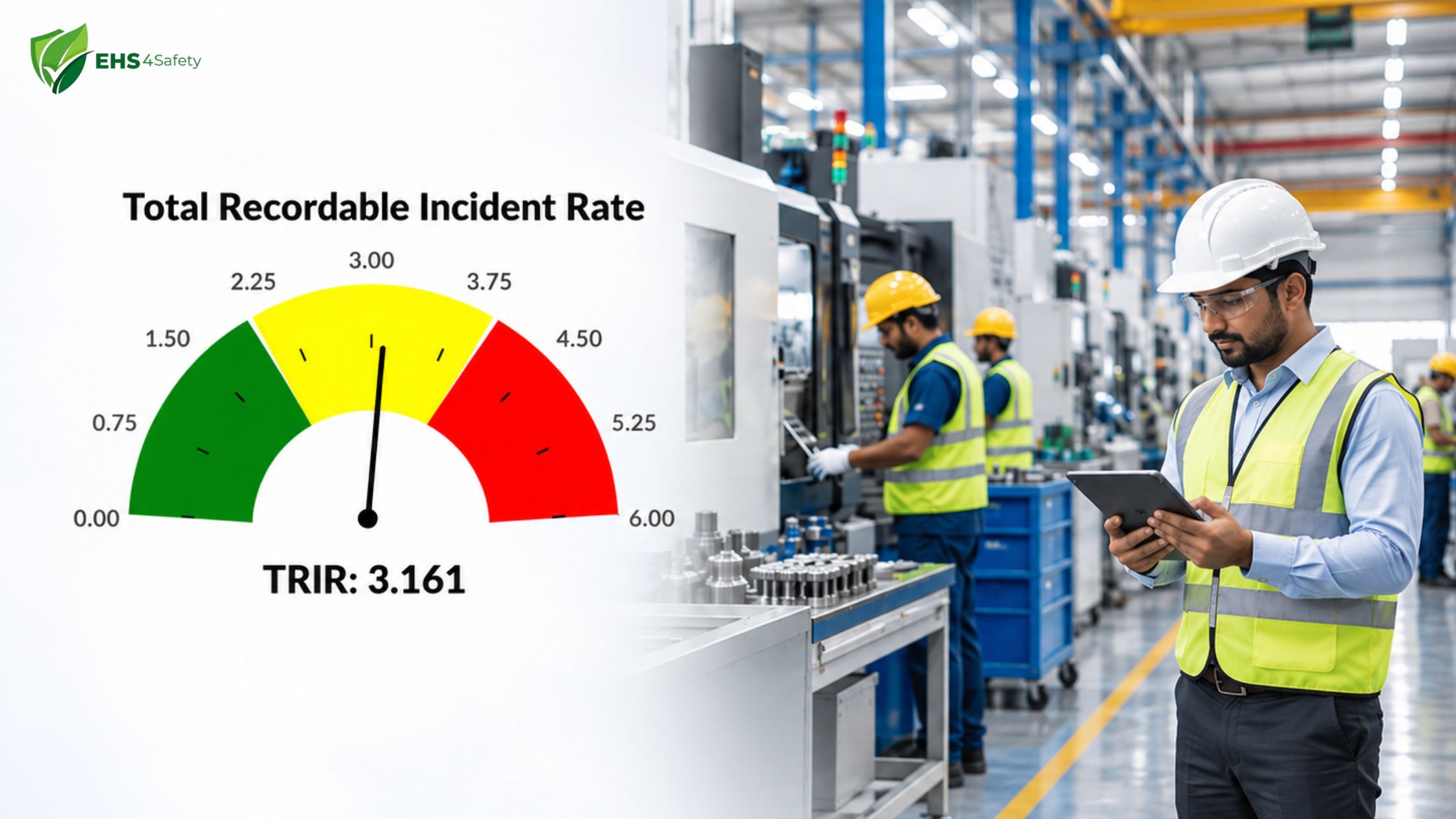
TRIR, short for total recordable incident rate, is one of the most widely used measures of workplace safety performance. It converts the number of injuries and illnesses at a site into a standard rate, so a plant with 200 employees can be compared fairly with one that has 2,000. Safety managers use TRIR to report to leadership, benchmark against industry peers, and answer client prequalification questionnaires. Insurers and contractors also review it closely before awarding work.
This guide explains what TRIR means, which cases count toward it, and how to calculate it step by step with a worked example. It also covers practical ways to lower your TRIR and shows how EHS software removes much of the manual effort from tracking it.
What Is TRIR?
TRIR is a lagging indicator that shows how many recordable injuries and illnesses occur for every 100 full-time employees over one year. Because it is based on hours worked rather than headcount, it accounts for overtime, part-time staff, and contractors, which makes it a fair basis for comparing sites, departments, and reporting years. A lower rate signals fewer harmful events relative to the hours worked, while a higher rate points to gaps in controls, training, or culture. It measures outcomes after harm has occurred, so it works best alongside leading indicators such as near miss reports and inspection completion rates.
How to Read a TRIR Gauge
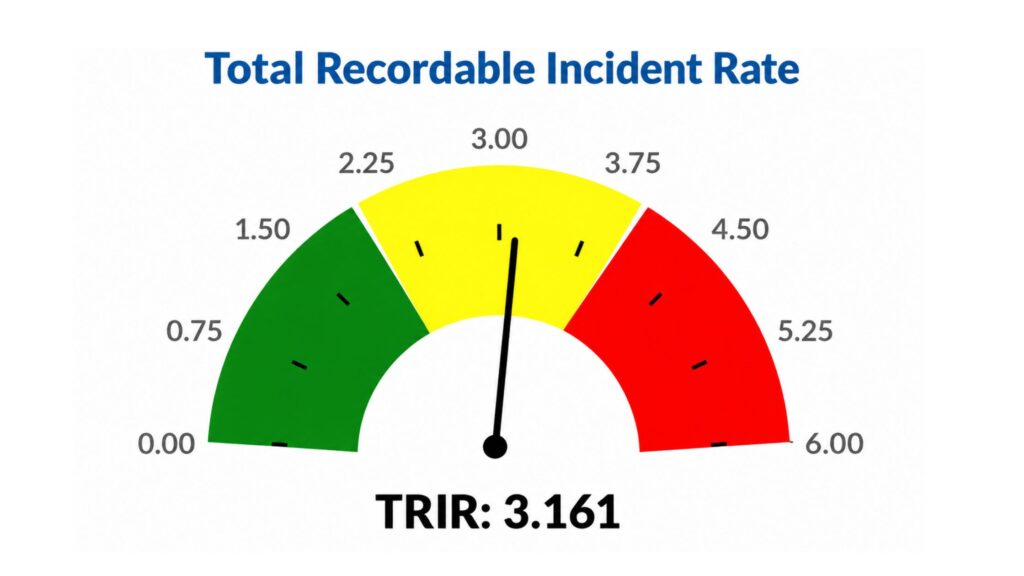
A TRIR gauge turns a single number into something safety teams and leadership can read at a glance. The dial in the image runs from 0.00 to 6.00, and the needle shows where the site stands. In this example, the TRIR is 3.161.
- Green zone: The left side of the dial represents a low rate, meaning the site records relatively few injuries for the hours worked. This is the range every safety team aims for.
- Yellow zone: The middle of the dial is the caution range. A TRIR of 3.161 sits here, which suggests moderate performance. It is not an emergency, but a small rise would move the site toward the red zone.
- Red zone: The right side signals a high rate. Injuries are occurring often enough that the site needs prompt action on investigations, controls, and training.
These color bands are a dashboard convention, not an official OSHA classification, and the right target depends on your industry. A reading that looks average in construction could be a serious concern in an office setting. For that reason, compare your TRIR against your sector average and your own results from previous years before deciding where your site really stands.
What Counts as a Recordable Incident?
Not every workplace injury is recordable. OSHA’s recordkeeping rule defines which work-related cases must be recorded. An injury or illness is recordable when it is work-related and results in one or more of the following outcomes.
- Work-related death: Any fatality caused by a work event or exposure is recordable, regardless of how much time passed between the incident and the death.
- Days away from work: If an employee cannot work on a scheduled day because of the injury, the case is recordable. The day of the incident itself is not counted toward the total.
- Restricted work or job transfer: When a worker can still work but cannot perform routine duties or is moved to a different role during recovery, the case is recordable.
- Medical treatment beyond first aid: Prescription medication, stitches, physical therapy, and similar care go beyond first aid. Simple measures such as cleaning a wound or applying a bandage do not.
The rule also covers cases involving loss of consciousness and significant injuries or illnesses diagnosed by a physician. Classifying a borderline case correctly matters, because over-recording inflates your TRIR and under-recording creates compliance risk.
The Total Recordable Incident Rate Formula
The total recordable incident rate formula is simple, but each input needs care.
TRIR = (Number of recordable incidents x 200,000) / Total hours worked by all employees
- Why 200,000: This constant equals 100 full-time employees working 40 hours a week for 50 weeks. Multiplying by it scales any workforce to a per-100-employee rate, which is what makes comparison possible.
- Number of recordable incidents: Take this from your incident records for the period you are measuring, usually one calendar year, counting only the cases that meet the recordable criteria.
- Total hours worked: Pull this from payroll. Include overtime and exclude paid leave such as vacation, sick days, and holidays, because those hours were not exposure time. If exact hours are unavailable, OSHA allows an estimate based on 2,000 hours per full-time employee per year.
Accuracy in both inputs is what makes your TRIR trustworthy. A missed incident or an inflated hours figure can change the result enough to affect client approvals and insurance conversations.
How to Calculate TRIR: Step-by-Step Example
Consider a manufacturing site that records 12 incidents in a year, with 480,000 total hours worked by all employees. Here is the calculation, one step at a time.
Step 1: Count the recordable incidents. Go through your incident records for the year and count only the cases that meet the recordable criteria (death, days away from work, restricted work or job transfer, or medical treatment beyond first aid). First aid cases and near misses are left out. In this example, the count is 12.
Step 2: Add up the total hours worked. Add the hours worked by every employee at the site for the same year, including overtime. Leave out paid leave such as vacation, sick days, and holidays. In this example, the site worked 480,000 hours. As a quick check, that matches roughly 240 full-time employees working a standard year:
240 employees x 40 hours x 50 weeks = 480,000 hours
Step 3: Multiply incidents by 200,000. The number 200,000 is the number of hours that 100 full-time employees work in a year (100 x 40 x 50 = 200,000). Multiplying by it converts your result to a rate per 100 employees. Here, 12 x 200,000 = 2,400,000.
Step 4: Divide by total hours worked. Divide the Step 3 result by the hours from Step 2. This adjusts for the real size of your workforce. Here, 2,400,000 / 480,000 = 5.0, which is your TRIR.
Step 5: Read the result. A TRIR of 5.0 means about five recordable injuries or illnesses for every 100 full-time employees during the year. The figure is meaningful only when compared against something, so check it against your industry average, your own prior years, and your internal target.
You can confirm the logic with the headcount estimate from Step 2. Twelve incidents spread across 240 full-time employees works out to five incidents per 100 employees, which matches the formula’s output.
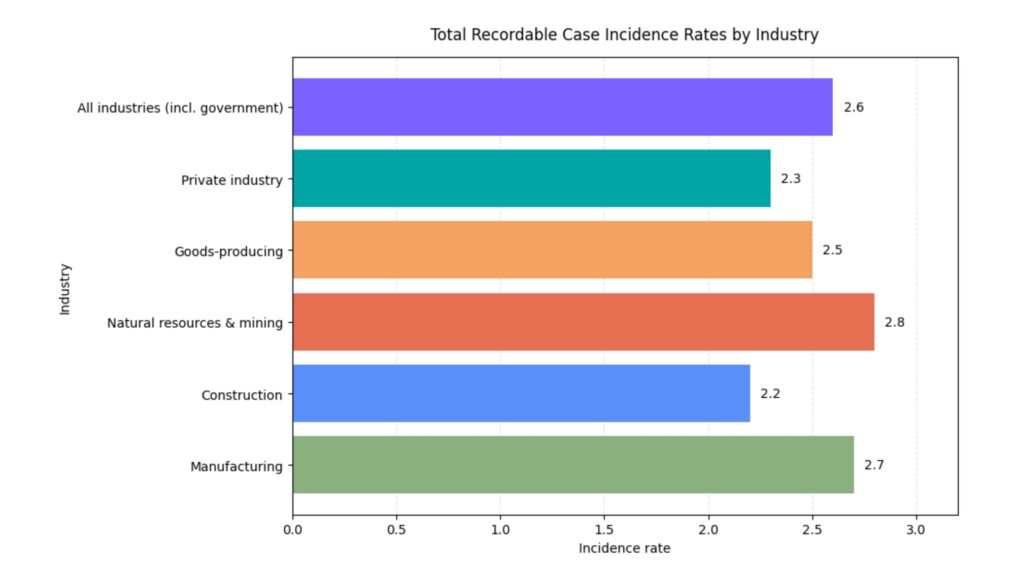
For benchmarking, the U.S. Bureau of Labor Statistics publishes industry incident rates that make a useful reference point. A TRIR that looks high in isolation may be average for a high-hazard sector such as construction or heavy manufacturing, while the same number would be a serious concern in an office environment.
How to Reduce Your TRIR
Lowering TRIR comes down to preventing the incidents that feed it. These practices tend to have the greatest effect.
- Root cause analysis: Investigate every recordable case to find the underlying system failure, not just the immediate trigger. Fixing a missing guard solves one problem, while understanding why inspections missed it prevents many.
- CAPA follow-through: Corrective and preventive actions only reduce your TRIR when they are assigned, tracked, and closed on time. Overdue actions are one of the most common reasons the same injury type returns.
- Risk assessment and JHA: A job hazard analysis breaks a task into steps and identifies the hazards in each one before work begins. Reviewing these regularly, especially after process changes, keeps controls aligned with real conditions.
- Training and toolbox talks: Short, frequent safety talks keep hazards visible to the people exposed to them. Role-specific training also helps new and contract workers, who are often at higher risk in their first months.
- Safety policies: Clear policies on incident reporting, stop-work authority, and contractor management set expectations for everyone on site. Early reporting of minor injuries lets you intervene before a pattern becomes a recordable case.
One caution applies here. Reducing TRIR should never mean discouraging employees from reporting injuries. Suppressed reporting hides real hazards, violates recordkeeping rules, and eventually leads to a more serious incident. A healthy program aims for a lower rate because fewer people are hurt, not because fewer cases are recorded.
How EHS Software Simplifies TRIR Tracking
Many teams still calculate TRIR from spreadsheets, paper records, and payroll exports. This approach is slow and prone to error, especially across multiple sites. A dedicated EHS platform removes most of that friction.
- Automated calculation: The software pulls recordable cases and hours worked into the formula automatically, so your TRIR updates as data changes instead of once a quarter.
- Multi-plant KPI views: Safety leaders can compare TRIR across plants, departments, and contractors on one dashboard, which makes it 1easier to spot where support is needed.
- Trend analysis: Month-over-month and year-over-year charts show whether your rate is improving and which incident types or locations drive it.
- Audit-ready records: Incident classifications, dates, and outcomes are stored in a consistent structure, so supporting documentation is available when auditors or clients ask for it.
- Integration with incident, RCA, and CAPA modules: When a recordable case is logged, the investigation and corrective actions follow in the same system. This connects your TRIR number directly to the work that improves it.
EHS4Safety’ EHS software brings these capabilities together so that safety teams spend less time compiling data and more time acting on it. You can explore the Incident Management, RCA, and CAPA modules to see how they feed an accurate and auditable TRIR.
Conclusion
TRIR gives organizations a consistent, comparable way to measure how often work results in recordable injuries or illnesses. The calculation itself is straightforward: multiply recordable incidents by 200,000, then divide by total hours worked. What takes discipline is gathering accurate inputs, classifying cases correctly, and using the result to drive action rather than simply report it.
Track your TRIR alongside leading indicators, investigate each case thoroughly, and close corrective actions without delay. With the right EHS software supporting that process, a lower total recordable incident rate becomes a realistic and measurable goal. To see how EHS4Safety can help you monitor TRIR across your sites, request a demo today.
TRIR FAQ
Formula: TRIR = (Recordable Incidents × 200,000) ÷ Total Hours Worked.