
A plant with 400 employees across three shifts, a dozen contractors on site for a shutdown, and a training spreadsheet last updated three weeks ago has a visibility problem rather than a training problem. An auditor asks for proof that every maintenance technician working on energized equipment holds a valid electrical safety certificate, and the search begins across folders and email threads. Employee Training Tracking Software exists to end that scramble by keeping training data structured, current, and easy to retrieve.
Safety training involves far more than conducting a session. EHS teams need visibility into who requires training, what has been assigned, who attended, who passed the assessment, which certificates are close to expiry, and where competency gaps remain. Paper registers, spreadsheets, emails, and separate certificate folders each hold a fragment of that picture, and the fragments become harder to reconcile as the workforce grows. In manufacturing, role-specific hazards, shift patterns, and contractor movement add further complexity.
What Is Employee Training Tracking Software?
Employee Training Tracking Software is a digital system used to organize, assign, monitor, record, and maintain employee training throughout its lifecycle. Each employee profile is linked to a job role, a department, and the training that role demands. From there, the system follows assignments, attendance, completion, assessment results, competency status, certification validity, refresher requirements, and renewal status.
A simple training record shows that an employee attended a session on a given date. Lifecycle tracking follows the full chain, from the requirement and its assignment through training, attendance, assessment, certification, expiry, and renewal. A record explains what happened. Lifecycle tracking also explains what is due, what is overdue, and what should happen next.
That broader view matters because training usually fails between stages rather than within them. A requirement identified after an incident may never reach the right employees. A certificate may be issued and then forgotten until it lapses. A refresher may be scheduled for one shift while the employees who need it work another. Tracking the whole chain exposes these breaks early. Terms such as employee training management software and safety training tracking software generally describe the same category.
How Does Employee Training Tracking Software Work?
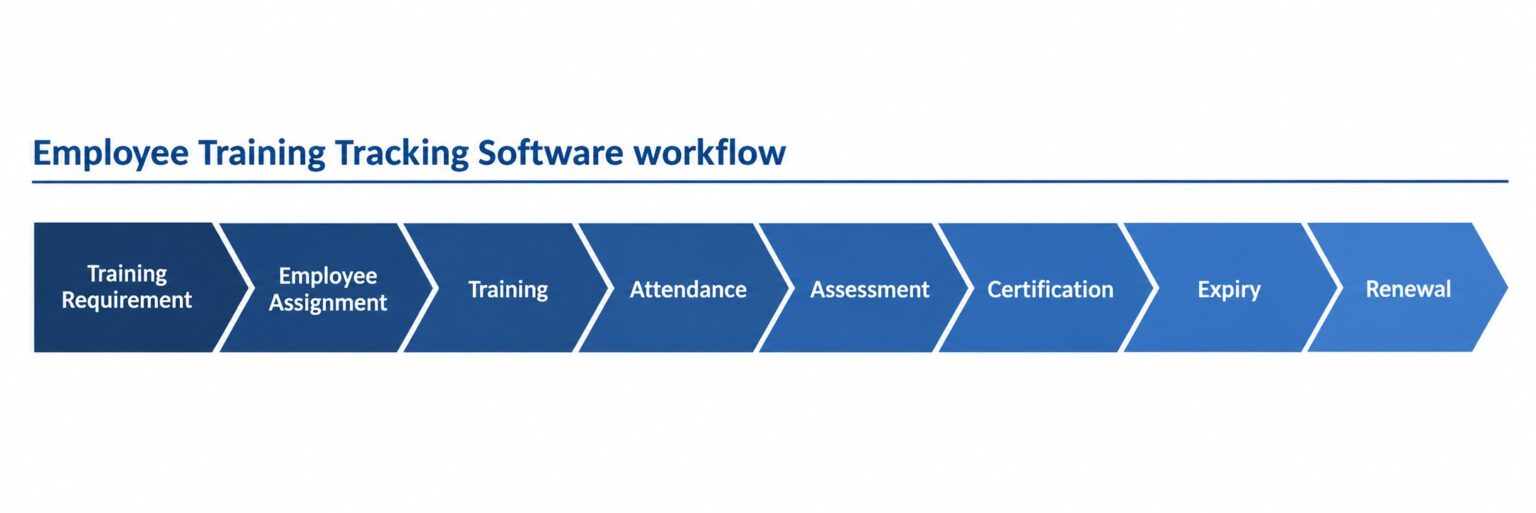
The workflow follows the order in which training is managed on a plant floor, from identifying a need to renewing a certificate.
Identify Training Requirements
Requirements can come from job roles, departments, locations, workplace hazards, regulatory obligations, risk assessments, competency standards, incidents, audit findings, and known training gaps. In a manufacturing unit, a press operator needs machine-specific safety training, while a maintenance technician needs electrical safety and LOTO. The software holds these requirements against roles, so they are defined once and applied consistently.
Assign Required Training
Training can be assigned to individual employees, job roles, departments, groups, or contractors. Automated notifications and reminders inform participants and supervisors about pending items, which reduces dependence on memory and phone calls.
Schedule Training Through a Training Calendar
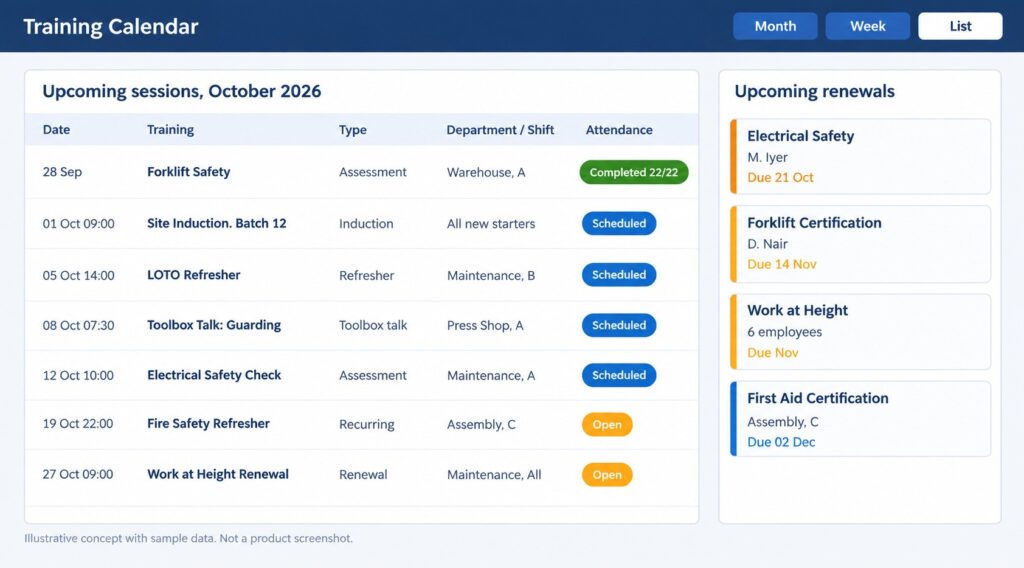
A Training Calendar allows EHS teams to plan mandatory sessions, refresher training, certification renewal sessions, competency assessments, induction batches, and recurring programs in one place. It shows what training is scheduled, when it is scheduled, who needs to attend, and which requirements are approaching. In a plant running three shifts, the calendar helps distribute a fire safety refresher across shifts and departments without pulling an entire line off production at once. A calendar supports planning, but attendance still depends on supervisors releasing people for sessions.
Deliver and Record Training
Delivery may be instructor-led, online, virtual, or blended, alongside toolbox talks and short safety sessions. Attendance can be captured through QR codes, digital check-ins, or mobile devices where the system supports them, so the participation record exists as soon as the session ends. Toolbox talks, though brief, still count as safety training and belong in the same record.
Assess and Certify
Quizzes, practical assessments, and competency evaluations verify learning beyond attendance. Successful completion produces a certificate, with its validity period recorded against the employee.
Monitor Expiry and Renewal
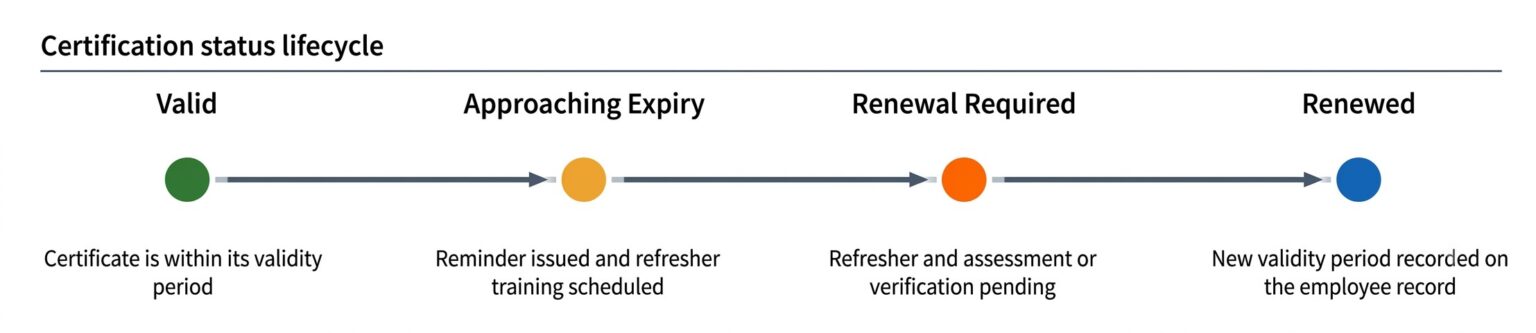
Certification status moves through defined stages. A certificate is recorded as completed, flagged as approaching expiry, marked expired if it lapses, shown as renewal required, and updated to renewed once the refresher is done. Reminders ahead of expiry give EHS teams time to arrange refresher training before a certificate lapses.
Key Features of Employee Training Tracking Software for EHS Teams
Centralized Training Records
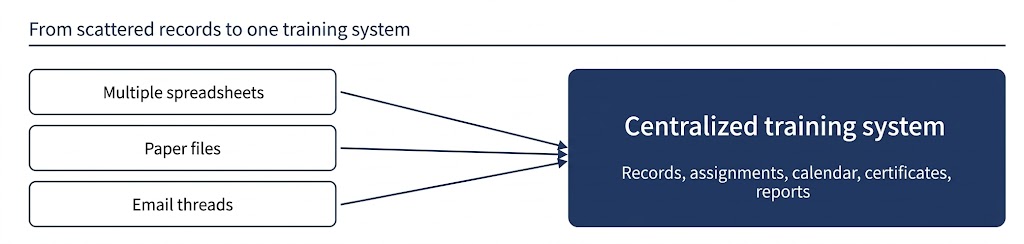
In many plants, attendance sheets sit in one office, certificates in a cabinet, and completion lists in spreadsheets maintained by individual departments. Centralized records place attendance, assessment results, and certificates against each employee profile. When a supervisor or auditor asks about one person, the answer comes from one place. For manufacturing EHS teams, the practical value is speed and reliability: a shift-change question about whether a temporary worker completed the required safety training no longer requires a walk to another building.
Automated Training Assignments
Assignments can follow role, department, location, or a specific requirement. When a new machine operator joins a department, the training attached to that role is assigned without a separate request. The same logic covers maintenance teams, supervisors, and contractors, each with a different requirement set. Consistency improves because assignment no longer depends on who remembers to raise it.
Training Calendar
Beyond planning, the calendar works as a coordination tool. Upcoming sessions, recurring programs, refresher cycles, induction batches, and renewal sessions appear together, and can be viewed by department or shift. Production planners see training dates early enough to arrange coverage, and EHS teams can spot weeks where too many renewals cluster.
Induction Training
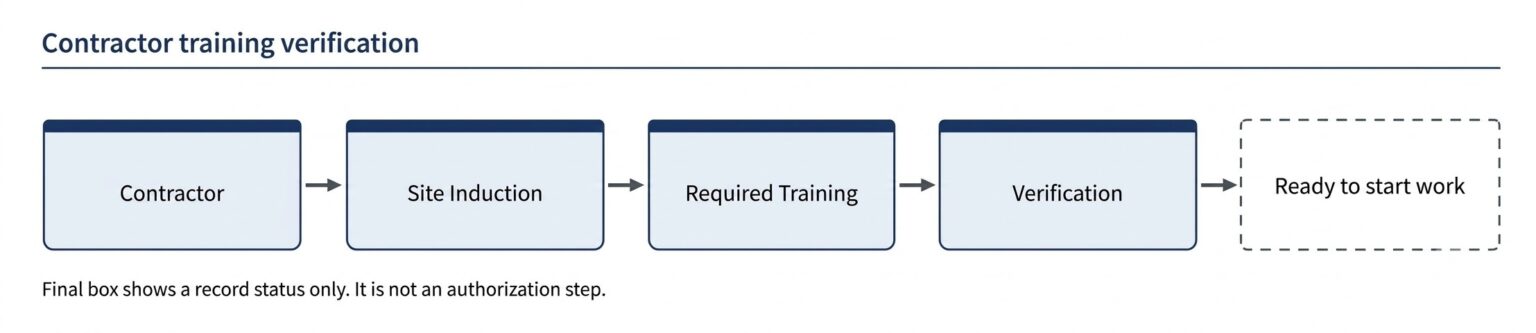
Induction Training is the first safety training received before starting work or entering a manufacturing site. It covers site safety rules, emergency procedures, PPE requirements, hazard awareness, restricted areas, safe work practices, reporting procedures, emergency contacts, and site-specific requirements. New employees, contractors, and temporary workers all need it, though the content differs.
Employee Training Tracking Software helps assign, schedule, record, and monitor induction completion within the same system used for later training. A new operator may need to complete site induction before starting work, while a contractor may require a separate site safety orientation before entering the plant. Induction is the starting point of an ongoing training lifecycle, from which role-specific, hazard-specific, and refresher training follow.
Training Completion and Attendance Tracking
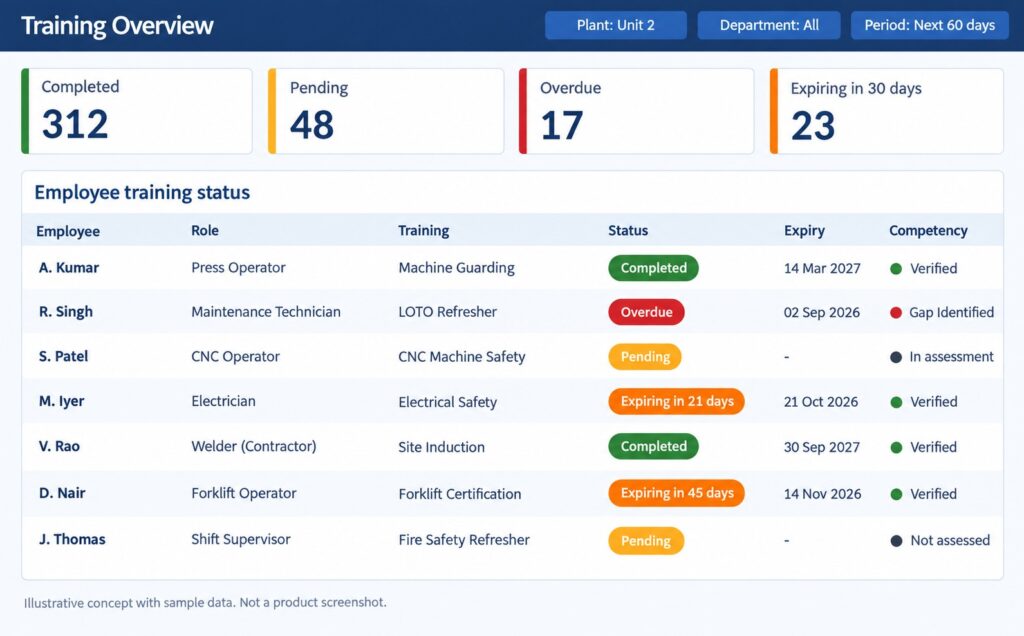
Status categories such as assigned, completed, pending, and overdue let EHS teams see progress without chasing departments individually. Attendance captured through QR codes, digital check-ins, or mobile devices keeps participation records current.
Certification and Expiry Tracking
Each certificate carries an issue date, a validity period, and an expiry date. The system monitors these dates and flags approaching expiry, so refresher training can be arranged while the certificate is still valid. Employee certification tracking of this kind covers safety certificates as well as licenses and qualifications.
Competency and Skill Gap Tracking
The logic starts with the competency a role requires. The employee’s current status is compared against it, any gap is identified, training is assigned, an assessment follows, and verification closes the loop. A skill matrix maps required competencies to job roles, so a gap becomes visible when an operator lacks a competency that a machine demands. In safety-sensitive roles such as press operation or electrical maintenance, attendance alone does not confirm that a person can perform the task safely.

Training Dashboards and Reports
Dashboards summarize completion, pending training, overdue training, certification status, upcoming renewals, and training gaps. Reports compile compliance-related records for management reviews and audits. A plant head might review department-wise overdue training before a monthly safety meeting, while an EHS manager tracks renewals falling due over the next quarter.
How Does Employee Training Tracking Software Help EHS Teams?
Improves Training Compliance Visibility
Dashboards show completed, pending, and overdue training, upcoming renewals, department-level gaps, and contractor training status. A plant head reviewing the maintenance department can see immediately that three technicians are overdue for LOTO refresher training. This supports compliance monitoring, although the software only records and reports status. Closing gaps remains the work of EHS teams and line supervisors. Contractor status appears alongside employee status, so a shutdown crew is not tracked in a separate file.
Reduces Manual Training Administration
Automated assignments, reminders, digital attendance, dashboards, and reports can reduce repetitive tasks such as compiling monthly completion lists, chasing signatures, and matching certificates to employees. Manual effort does not disappear, since sessions still need planning and trainers need coordination. Time spent on record keeping can shift toward training quality and shop-floor follow-up. For an EHS team of two or three people covering hundreds of employees, that redirected time is significant.
Helps Prevent Missed Training Renewals
The renewal path is straightforward. A certification approaching expiry triggers a reminder, which leads to refresher training, then an assessment or verification, and finally renewal. In manufacturing, a lapsed certificate for a crane operator or an electrician raises immediate operational questions. Reminders sent well ahead give EHS teams time to schedule refresher sessions around production needs. Reminders assist the process, but renewal still requires the employee to attend and pass.
Supports Audit Readiness
Internal audits, customer audits, certification reviews, and regulatory inspections commonly request training completion records, attendance, certificates, assessment results, competency records, and renewal history. When these sit in one system, retrieval takes minutes rather than days. Organized records make preparation easier, but they do not guarantee an audit outcome.
Helps Identify Training Gaps
Comparing required training against completed training exposes gaps. When a new CNC machine is installed, machine-specific safety training is assigned to the affected operators. A gap report then shows which night-shift operators have not completed it, before an incident or an auditor points it out. The same comparison helps after incidents: if an investigation identifies a missing skill, corrective training can be assigned to everyone with the same exposure and tracked to completion.
Supports Contractor Training Tracking
Contractors are often engaged during shutdowns and maintenance campaigns, when crews change frequently and informal tracking breaks down. Site induction, safety orientation, job-specific training, hazard-related training, and certifications all apply to them. Centralized records let EHS teams verify contractor training status before work begins. Records showing induction date, completed courses, and certificate validity give EHS teams a factual basis for that check.
Employee Training Tracking Software vs. Manual Training Tracking
| Area | Manual Training Tracking |
Employee Training Tracking Software |
|---|---|---|
| Training records | Paper files/spreadsheets | Centralized digital records |
| Training assignments | Manual | Structured/automated |
| Completion tracking | Manual checking | Centralized status visibility |
| Attendance | Paper/separate records | Digital records |
| Expiry tracking | Calendar/spreadsheet | Expiry monitoring and reminders |
| Certificates | Separate files | Centralized records |
| Competency | Difficult to monitor | Structured competency tracking |
| Reporting | Manual compilation | Dashboards and reports |
| Audit preparation | Time-consuming | Faster record retrieval |
| Training scheduling | Separate calendars | Centralized training calendar |
Manual tracking can work in a small plant with a stable workforce and limited certification requirements. Difficulty grows with scale. Spreadsheets multiply as workforce size, training requirements, contractor numbers, and certification types increase. Multiple shifts make a single reliable schedule harder to maintain, and reporting requests that began as a monthly completion list turn into detailed queries by department, role, and expiry date. In practice, a compliance lead may spend the week before an audit reconciling attendance sheets with certificate copies and spreadsheet entries. A centralized system moves that reconciliation into routine daily updates, so records stay current instead of being rebuilt under deadline pressure. Manual methods retain some value for informal toolbox talks in small teams, but even those benefit from a digital record once they serve as compliance evidence.
What Should Manufacturing Units Look for in Employee Training Tracking Software?
Role-Based Training
Requirements differ sharply between operators, maintenance personnel, supervisors, and contractors. A system that maps training to roles, rather than relying on manual assignment for each person, keeps requirements consistent when employees transfer departments or new starters join a shift.
Training Calendar and Scheduling
Training in a plant competes with production targets. Scheduling that accommodates shifts, departments, recurring requirements, and certification renewals allows EHS teams to plan sessions early and avoid clashes with production peaks and maintenance shutdowns.
Certification and Renewal Management
Expiry visibility should extend beyond a date field. Reminders ahead of expiry, along with a clear route to refresher training, allow renewals to be arranged while certificates are still valid.
Competency Tracking
Completion alone may not demonstrate competency. A machine operator who attended a session has not necessarily shown the ability to operate safely, so assessment results, practical evaluations, and skill gaps should be recorded and reviewed.
Reporting and Dashboards
EHS teams need clear visibility into training status and gaps at plant, department, and role level. Reports should be usable in management reviews and audit discussions without manual compilation.
Contractor and Induction Training
Industrial facilities host contractors and new starters constantly. Both groups need site induction before entering work areas, and the records should show who completed it, when, and which additional training applies to their tasks.
Centralized Training Records
Records should be easy to access when a supervisor, auditor, or plant head asks for them. Scattered files defeat the purpose of tracking, so attendance, assessments, and certificates should sit together against each employee.
Building a More Structured EHS Training Process
A structured process runs from identifying requirements through scheduling, assignment, training, assessment, certification, tracking, and renewal. Training requirements come first, drawn from roles, hazards, and audit findings. The Training Calendar then places sessions, including induction and recurring programs, around shifts and production. Role-based assignments reach the right employees. Attendance is recorded, assessments verify learning, and certificates capture competency with a validity period. Tracking keeps expiry dates and gaps visible, and renewal starts the cycle again. A hazard identified in a risk assessment, for example, becomes a training requirement, moves onto the calendar, reaches the operators exposed to it, and ends as an assessed, certified competency with a renewal date. Each stage feeds the next, so a gap at any point shows up in the records rather than on the shop floor.
Conclusion
Employee Training Tracking Software is not simply a digital attendance register. It can help EHS teams manage the complete training lifecycle, from identifying requirements and scheduling sessions through assignment, training, assessment, certification, tracking, and renewal. Centralized records, a Training Calendar, induction training, automated assignments, attendance tracking, competency tracking, certification management, expiry monitoring, dashboards, reporting, and contractor training together improve training visibility and make administration more structured for manufacturing EHS teams. Attendance records show who was present; the full lifecycle shows who is qualified, who is due for renewal, and where the next gap is likely to appear.
Manufacturing organizations exploring this area can review EHS4Safety Safety Training Management Software, which covers training planning, employee enrollment, scheduling, attendance, competency assessment, certification tracking, renewals, and contractor training, or request a demonstration to see how it fits a plant’s training process.