
Introduction
Every facility that stores, handles, or transports hazardous chemicals has to keep employees informed about the risks those substances carry. That information lives in Safety Data Sheets (SDS), and for organizations managing hundreds or thousands of chemical products, keeping those documents organized, current, and within reach becomes a real operational challenge fairly quickly. That’s the problem Safety Data Sheet Software was built to solve. Instead of binders, shared drives, or a folder full of loose PDFs, many companies now use purpose-built platforms that handle the collection, storage, and distribution of SDS documents automatically. This article walks through what Safety Data Sheet Software is, how it actually works from start to finish, and why so many safety teams now treat it as a compliance essential rather than a nice-to-have.
What Are Safety Data Sheets (SDS)?
A Safety Data Sheet is a standardized document containing detailed information about a hazardous chemical: its physical and chemical properties, health effects, storage and handling requirements, first-aid measures, and disposal guidance. Under the Globally Harmonized System (GHS), every SDS follows the same 16-section layout, covering everything from basic identification and hazard classification through to toxicological data and regulatory notes.
Manufacturers and suppliers are required to provide an SDS for every hazardous chemical they sell, and employers, in turn, have to make sure those documents are readily accessible to any employee who might be exposed to the chemical on the job. In a manufacturing plant, lab, warehouse, or hospital, that can mean hundreds or even thousands of chemicals in use at once, each with its own SDS that needs to stay current.
What Is Safety Data Sheets Software?
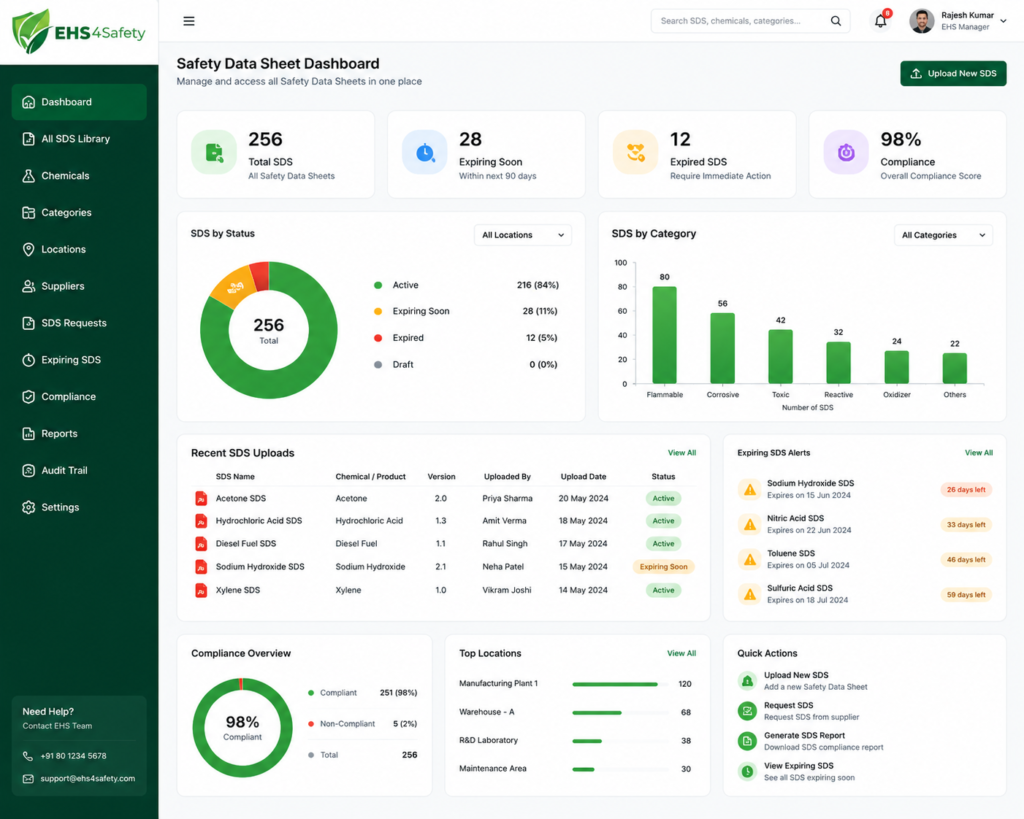
Safety Data Sheet Software is a digital platform built to centralize the collection, storage, management, and distribution of SDS documents across an organization. Rather than manually chasing suppliers for updated sheets, filing paper copies, or checking by hand whether a revision has come out, the software handles most of that work in the background so safety teams can trust that what they’re looking at is current and accurate.
At its core, this kind of software works like a searchable digital library layered with workflow tools that manage each document’s lifecycle: acquisition, review, approval, distribution, and eventual archiving. Many platforms go further, adding modules for chemical inventory tracking, regulatory reporting, incident logging, and mobile access for people on the floor.
Core Features of SDS Software
Platforms vary in sophistication, but most Safety Data Sheet Software solutions share a similar core toolkit:
- Centralized digital library: one repository where every SDS document lives, indexed and searchable
- Automated SDS retrieval: tools that pull updated sheets directly from manufacturers or third-party databases
- Search and retrieval: fast lookup by product name, manufacturer, CAS number, or hazard class
- Version control: outdated sheets get flagged or replaced automatically as revisions come in
- Mobile and offline access: QR codes or a mobile app so workers can pull up an SDS from the shop floor
- Regulatory compliance tools: built-in alignment with GHS, OSHA HazCom, and regional variations
- Chemical inventory management: SDS records linked to actual on-site quantities and locations
- Reporting and audit trails: logs that hold up during inspections or internal audits
- User permissions and approval workflows: control over who can add, edit, or approve documents
How Does SDS Software Actually Work? (Step-by-Step)
Seeing how Safety Data Sheet Software operates day to day helps explain why EHS (Environment, Health, and Safety) teams have come to rely on it. The process generally moves through seven stages.
SDS Acquisition
It starts with getting the SDS for every chemical product coming into the facility. That might happen through a direct upload by staff, an automated request sent to a supplier, or a pull from one of the large SDS databases that many vendors maintain.
SDS Information Capture
Once a document arrives, the software pulls out and organizes the key data product identifiers, hazard classifications, CAS numbers, manufacturer details, and revision dates. This structured capture is what makes later search, filtering, and reporting actually work, instead of leaving the SDS as a static PDF nobody can search. AI can capture critical information from large SDS documents in a fraction of time. Before a new or updated SDS becomes part of the official record, it usually goes through a validation step. An EHS professional might confirm the document is complete, current, and matches the exact product variant used at the facility.
SDS Approval and Central Storage
Once it’s validated, the document gets formally approved and moves into the central digital library. From there, it becomes the authoritative version accessible to anyone with the right permissions, replacing whatever version came before it.
Digital Library
This is also where the software earns its keep day to day. Employees, supervisors, and emergency responders can pull up an SDS instantly, whether from a desktop terminal, a plant-floor kiosk, or a phone via QR code, and that speed matters most in an emergency. The library doesn’t stay static, either. Manufacturers update SDS documents as new data comes in or regulations shift, and the software monitors those updates automatically, alerting safety managers when a newer version is available.
Archiving and Record Retention
Even a superseded SDS often has to be kept around for regulatory or legal reasons, sometimes for 30 years or more, depending on the jurisdiction and industry. The software archives older versions in a way that preserves the historical record without cluttering up the active library.
Compliance: The Real Reason Companies Invest in SDS Software
Convenience is nice, but compliance is really what drives adoption. Failing to keep accurate, accessible SDS records can mean fines, failed audits, and more importantly, preventable injuries on the job.
GHS
The Globally Harmonized System of Classification and Labelling of Chemicals (GHS) sets a consistent international framework for classifying and communicating chemical hazards, including the standardized 16-section SDS layout. Safety Data Sheet Software helps make sure every document in a company’s library follows current GHS formatting and hazard classification rules, which matters a lot for companies operating across several countries.
Broadly, those 16 sections break down like this:
- Sections 1 through 3 cover identification what the substance is, who made it, and what hazardous components it contains
- Sections 4 through 8 cover emergency response first aid, firefighting, spill response, handling and storage, and PPE
- Sections 9 through 11 cover technical properties physical and chemical characteristics, stability, reactivity, and toxicology
- Sections 12 through 15 cover environmental impact, disposal, transport classification, and regulatory information
- Section 16 covers revision history and any other relevant notes
Safety Data Sheet Software checks incoming documents against this structure and flags anything missing a required section or formatted in a non-standard way before it gets added to the active library.
OSHA HazCom
In the United States, OSHA’s Hazard Communication Standard (HazCom) requires employers to keep an SDS for every hazardous chemical on-site and to make sure it’s readily accessible to employees during their shifts. OSHA inspectors routinely check for this during site visits, and gaps in SDS documentation are a common source of citations. SDS software supports HazCom compliance directly by keeping documents current, complete, and instantly retrievable.
Spill Incident Reporting
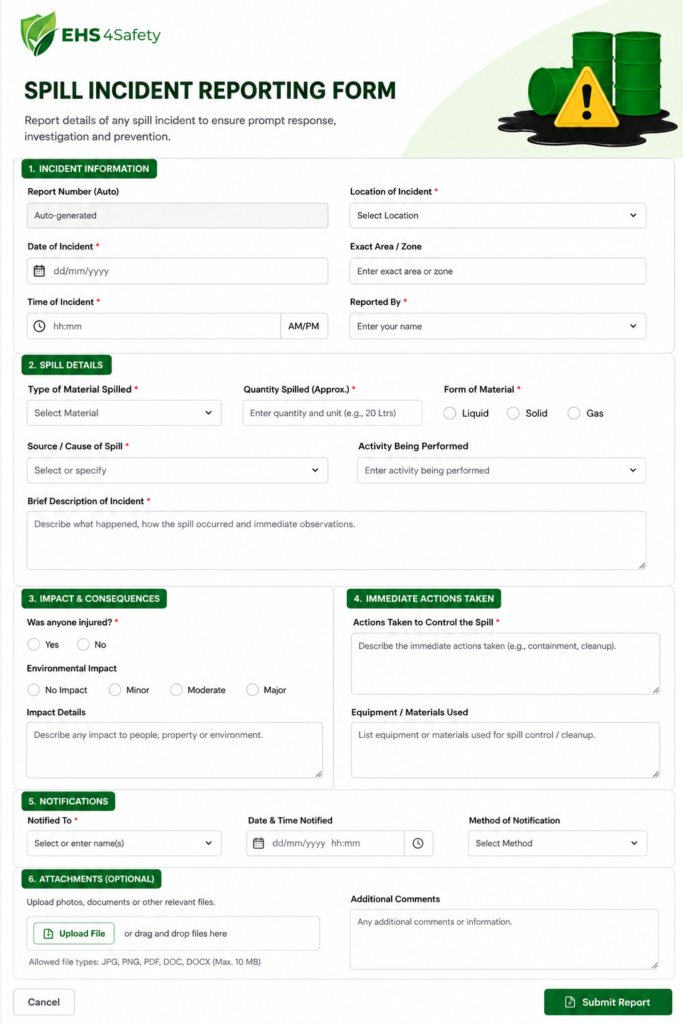
One feature that’s become close to standard in modern platforms is integrated spill and incident reporting. When a spill or exposure occurs, linking the relevant SDS directly to the incident report speeds up the response, keeps the right first-aid and containment steps front and center, and leaves a documented record for regulatory reporting and internal review. This link between hazard data and incident management is one of the clearest signs that SDS software has moved past simple document storage into active safety management.
SDS Software vs. Manual Management Table Comparison
Here's how manual SDS management stacks up against Safety Data Sheet Software across the factors that matter most to EHS teams.
| Factor | Manual SDS Management | Safety Data Sheet Software |
|---|---|---|
| Document retrieval time | Minutes to hours are spent digging through binders, filing cabinets, or shared drives; it's worse if the document was misfiled or the folder structure isn't intuitive | Seconds, through a searchable digital library indexed by product name, CAS number, or manufacturer |
| Version accuracy | High risk of outdated sheets, since supplier revisions are easy to miss with no automatic way to know a newer version exists | Automated tracking that monitors manufacturer databases and flags or replaces outdated versions as soon as a revision is published |
| Accessibility during emergencies | Limited to wherever the binder or terminal physically sits, which may not be reachable from the work area | Mobile and QR-code access that lets workers pull up the correct SDS from a phone or tablet right at the point of use |
| Audit readiness | Manual compilation ahead of an inspection, often taking staff days to assemble and cross-check records | Instant, pre-organized reports and audit trails generated on demand |
| Scalability | It gets difficult once an inventory grows past a few hundred products, with filing errors piling up as volume rises | Handles thousands of SDS records with consistent organization, no matter how large or varied the inventory gets |
| Compliance risk | Higher, since manual processes leave more room for human error, missed updates, and inconsistent recordkeeping across departments or sites | Lower, thanks to built-in checks aligned to GHS, OSHA HazCom, and other regulatory frameworks |
Industries That Benefit Most from SDS Software
Any organization handling hazardous chemicals can benefit, but a few industries rely on Safety Data Sheet Software particularly heavily, given the scale or risk level of what they’re working with.
- Manufacturing Production facilities often run multiple lines, each using its own mix of solvents, lubricants, coatings, and raw chemical inputs. As product lines shift or suppliers change, the SDS library has to keep up constantly. Safety Data Sheet Software gives plant safety managers one current view of every chemical in use across the facility, instead of tracking updates line by line.
- Oil and gas This industry handles some of the highest-hazard materials around, including flammable, toxic, and pressurized substances, often in remote or offshore locations. Documentation here isn’t optional; regulators and insurers expect airtight records, and any gap in hazard communication can carry serious safety and financial consequences. SDS software keeps hazard data consistent across every site or rig, however spread out operations are.
- Construction Job sites are inherently mobile, with crews, equipment, and chemical products (adhesives, sealants, fuels, and cleaning agents) moving between locations on a rotating basis. Keeping a physical binder current at every site just isn’t practical. Mobile-accessible SDS software lets supervisors and workers pull up the right hazard information from a phone or tablet, wherever they happen to be working.
- Healthcare and laboratories Hospitals, clinics, and research labs work through an unusually diverse and fast-changing mix of reagents, disinfectants, and pharmaceuticals, many ordered in small batches and swapped out often. That turnover makes manual tracking especially error-prone. SDS software helps labs keep pace by flagging new products that need documentation and retiring records for chemicals no longer in use.
- Warehousing and logistics Chemicals in transit or short-term storage carry the same hazards as those used on a production floor, but the people handling them, drivers, dockworkers, and warehouse staff, aren’t always chemical specialists. Fast, mobile access to hazard data matters most when a container is damaged or a spill happens during loading or unloading. SDS software puts the right information at the point of handling, not back in a central office somewhere.
What to Look For When Choosing SDS Software
The right platform depends on the size and complexity of an organization’s chemical inventory, but a few things matter across the board:
- Ease of searching and mobile access for frontline workers
- Automated update monitoring so outdated sheets don’t slip through unnoticed
- Integration with existing chemical inventory or ERP systems
- Solid audit trail and reporting capabilities
- Support for multiple regulatory frameworks (GHS, OSHA, WHMIS, REACH, etc.)
- Reliable customer support and a well-maintained SDS database
- Room to scale as the chemical inventory grows
- Automated notification
- AI-based data capture
AI-Driven SDS Management
AI has genuinely sped up how Safety Data Sheet Software captures and organizes data document scanning, data extraction, and search all move faster because of it. Even so, AI works best as an accelerator for these tasks, not a replacement for professional judgment. It can help staff move faster and catch obvious mistakes, but decisions about chemical safety, compliance, and risk still need review from a qualified EHS professional. That distinction matters, because it clears up a lot of the confusion around what AI-enabled SDS platforms can and can’t do.
AI PPE Detection
Some assume that because a platform is “AI-enabled,” it can automatically monitor camera feeds and confirm whether workers are wearing the correct PPE detection for the chemicals they’re handling. That capability belongs to a different category of tool entirely — computer-vision-based safety monitoring — and most SDS software isn’t built to do this. What it can do is tell workers which PPE the SDS calls for; whether someone is actually wearing it is still down to supervision and site procedure.
Unauthorized Entry
There’s a similar misconception that SDS software can flag or prevent unauthorized entry into a chemical storage area on its own. Access control is a separate system, usually tied to badges, locks, or building security, and SDS software typically doesn’t have any visibility into who physically enters a space. It can document the hazards present in that area, but keeping people out of it if they aren’t supposed to be there is a physical security matter, not a documentation one.
Upload the Document; It Captures All the Information in the Document
A lot of people assume that uploading a PDF is enough for the software to extract every data point perfectly. In practice, extraction accuracy depends heavily on scan quality, how consistent the document’s formatting is, and how sophisticated the underlying OCR or AI model happens to be. Validation still has to happen to catch fields that got missed or misread.
Identify the Risk and Parameters and Handling Process for the Document
Some users expect the software to work out handling procedures or risk parameters on its own, beyond what’s actually written in the SDS. That’s not quite how it works. SDS software organizes and surfaces the information the manufacturer provided; it doesn’t generate new risk assessments or handling protocols from scratch. Site-specific risk assessments still need input from qualified EHS personnel.
When Documentation Failures Have Real Consequences: A Case Study Beirut
On August 4, 2020, a devastating explosion occurred at the Port of Beirut after a large quantity of ammonium nitrate had been stored at the port for several years. The incident caused widespread destruction and highlighted serious concerns around the storage and management of hazardous materials. For organizations handling chemicals, the event demonstrated why accurate hazard information, proper storage controls, risk assessment, emergency preparedness, and clear access to safety documentation are critical.
For industrial facilities, an SDS Software system can help organize and manage Safety Data Sheets for hazardous chemicals used or stored on-site. Instead of relying on scattered paper documents or outdated files, employees and safety teams can access the relevant SDS information digitally. This can make it easier to understand chemical hazards, recommended storage conditions, handling precautions, PPE requirements, and emergency response information.
The Beirut incident also demonstrates that maintaining an SDS is only one part of chemical safety. Organizations must combine accurate SDS information with proper chemical inventory management, storage inspections, risk assessments, employee training, and emergency response procedures. A centralized SDS management system can support these activities by helping safety teams maintain current documentation and ensure that important chemical information is available when required.
Key Lesson: The Beirut accident serves as a reminder that hazardous-material safety requires more than documentation. Organizations need a connected approach in which SDS information, chemical inventories, risk controls, inspections, and emergency preparedness work together to reduce the potential consequences of chemical incidents. Regular audits is required

The Future of SDS Management
Safety Data Sheet Software keeps evolving. Expect deeper AI-assisted document parsing, tighter integration with chemical inventory and procurement systems, real-time regulatory update feeds, and better mobile and wearable access for frontline workers. As regulations around the world continue to converge around the GHS framework, these platforms will play an even bigger role in helping multinational organizations keep chemical safety documentation consistent and compliant across every site they run.
Conclusion
Safety Data Sheet Software has gone from a convenience to something close to a compliance necessity for any organization that handles hazardous chemicals. By automating the acquisition, validation, storage, and distribution of SDS documents, these platforms cut regulatory risk, save real administrative time, and most importantly, make sure accurate hazard information is there the moment someone needs it. As chemical inventories grow more complex and regulatory scrutiny tightens, investing in reliable Safety Data Sheet Software is one of the clearest ways an organization can protect both its people and its compliance standing.


