Introduction
On a busy production floor, a near miss rarely announces itself. A pallet jack clips a rack leg, a machine guard is left open for thirty seconds during a changeover, a technician steps around a wet patch near an electrical panel nothing happens, and the shift moves on. Near Miss Reporting Software exists precisely for that gap between “nothing happened” and “something almost did.” Manufacturing environments generate dozens of these small warning signs every week, and most disappear the moment the worker walks away from the spot.
Paper logs and verbal handoffs to a shift supervisor rarely survive the trip to the EHS office; intact details get softened, locations get vague, and by the time anyone reviews the event, the physical evidence is gone. A purpose-built reporting platform closes that gap by capturing the event where it happens, routing it to the right people immediately, and keeping a structured record that can actually be analyzed. This article sets aside the general case for why near-miss reporting matters and focuses instead on what the software itself needs to do, the specific features that separate a functional near miss reporting system from a form that quietly gets ignored.
Key Features of Near Miss Reporting Software for Manufacturing
Easy and Accessible Near Miss Reporting
The single biggest predictor of whether near misses get reported at all is how much friction sits between noticing the event and logging it. The fewer steps between spotting a hazard and filing a record, the more likely that record actually gets created.
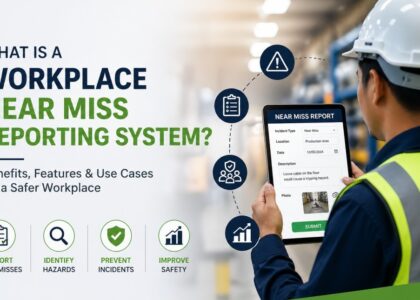
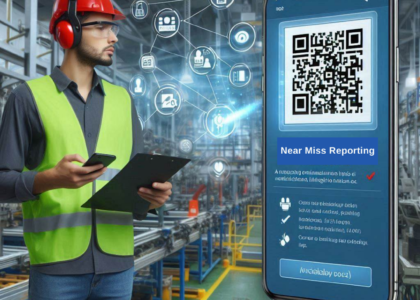
A near miss reporting app built for a smartphone or shared tablet lets a machine operator file a near miss from the floor in under a minute, rather than walking to an office, finding a form, and reconstructing the details from memory later. QR code reporting extends this further by tying the report directly to its physical source equipment, workstations, and high-traffic zones like forklift aisles or loading docks can each carry a code that, when scanned, opens a pre-populated report already tagged with that location.
A worker walking past a conveyor with an exposed pinch point does not need to remember an asset number or describe where the guard panel is missing; the code has already told the system. Fixed kiosk terminals serve a related purpose on plant floors where personal devices are restricted, giving every shift worker, including contractors and temporary staff, a consistent place to log a concern.
Taken together, an accessible reporting capability for a manufacturing site typically includes:
- A mobile app or browser-based form that opens in under a minute on a phone or shared tablet
- QR codes on equipment and high-traffic zones that pre-populate the location field automatically
- Fixed kiosk terminals for areas where personal devices are restricted or unavailable
- Short, structured digital forms that avoid long free-text narratives up front
- Anonymous submission for workers reluctant to attach their name to a coworker’s or supervisor’s area
That last point deserves its own explanation. Some employees, particularly newer hires or contractors working under a different company’s supervision, are reluctant to put their name on a report that involves someone else’s equipment or area.
Allowing a report to be submitted without identifying information, while still capturing full event detail, tends to increase the volume of reports coming in from parts of the plant that otherwise stay quiet. A reporting system that is easy to reach, quick to complete, and safe to use without fear of exposure is the foundation everything else in a near-miss program depends on.
Photo and Video Evidence Capture
A written description of a near miss is useful, but it is also subject to interpretation. “The rack was leaning” means something different to the person who saw it than to the investigator reading about it two days later. Attaching a photograph or short video clip directly to the report, captured on the same device used to file it, removes a layer of ambiguity that words alone cannot.
For a maintenance technician reporting an exposed live wire during a panel inspection, or a warehouse associate flagging drums stacked too close to an emergency exit, a photo shows angle, distance, and context that a paragraph of text tends to flatten. Investigators reviewing the report later can assess severity and root cause without physically revisiting a condition that, in many cases, has already been corrected by the time anyone follows up.
Video adds further value for near misses involving motion, a forklift taking a blind corner too fast, or a load swinging unexpectedly during a crane lift where a still image cannot fully convey what happened. Evidence attached at the point of reporting also holds up better during audits, since it is timestamped and tied directly to the original submission rather than added retroactively, giving the investigation record a level of detail that plain narrative description on its own cannot match.
AI-Powered Near Miss Detection Through Cameras
Employee reporting only captures what someone notices, and it takes time to report, so real unsafe acts go unrecorded because human attention has limits and close calls happen fast.
AI near-miss detection through camera systems solve this by watching the plant floor proactively, in real time spotting risky situations as they’re forming, not after the fact. The moment a defined risk pattern is detected, the system automatically generates a near-miss report and alerts safety personnel instantly, complete with a timestamped video clip, with no one needing to notice or file anything.
Typical patterns detected:
- Person entering a restricted zone while equipment runs
- Forklift/vehicle too close to a pedestrian walkway
- Machine guard left open during operation
- Worker in a PPE zone without required gear
So the safety team finds out right away, instead of relying on someone to remember and report it later.
AI-Assisted Root Cause Analysis
Finding the real cause of a near miss is one of the hardest parts of any investigation, especially under time pressure. It’s easy to write “operator error” and close the report, but that doesn’t explain why the error happened or how to stop it from happening again.
Structured methods like the Five Whys, fishbone or other methods exist for this reason they push investigators past the first easy answer and toward the real, underlying cause.
AI support makes this process easier by:
- Ai application aid the safety engineer by providing a suggestion of contributing factors which can get missed some times
- AI suggestions are derived by custom-trained large language models on safety, which make it more efficient and accurate
- Prompting the investigator to check contributing factors like equipment condition, training gaps, or scheduling pressure
- Reducing the chances of the same near miss happening again by making sure the fix addresses the root cause, not just the immediate cause.
- Ai can reduce the root cause analysis by 3 times
Near Miss Reporting Software for Investigation Management
A report is only the starting point what happens after determines whether a near miss actually leads to a safer condition or just becomes a forgotten data point. Near miss reporting software keeps investigation inside the same system used to capture the report, so nothing gets lost in email threads or spreadsheets an investigator has to reconstruct weeks later. It drives real root cause analysis instead of just noting the surface trigger. Each corrective action gets a clear owner and due date. Closure is confirmed only after verifying the fix actually works. Tracking patterns across locations, shifts, and equipment catches recurring risks early. This closed loop of investigate, correct, and verify is what actively prevents future occurrences.
A structured investigation record in a manufacturing context typically holds:
- The event details as originally reported, including the specific location
- Any photo or video evidence attached at the time of submission
- Notes on contributing factors identified during the review
- The investigator’s findings and conclusions
- The personnel responsible for follow-up
- near miss investigation open, under review, or closed
keeps the entire investigation inside the same system used to file the original report, so nothing gets lost in emails or spreadsheets. Weeks later, an investigator can pull up the original photo, description, and related near-miss reports from the same area in seconds no chasing people down or relying on memory. That continuity is what separates a real investigation from a paperwork exercise, and it’s built into the platform by design, not left to individual discipline. The result is faster investigations, stronger root-cause data, and fewer repeat incidents for the customer.
Automated CAPA and Corrective Action Tracking
Identifying a root cause accomplishes little if the corrective action tied to it never gets completed. Near miss corrective action tracking turns an investigation finding into an assigned, time-bound task rather than a note buried in a report, and this is where many manual EHS processes quietly fail, a corrective action gets agreed on verbally and then forgotten once the immediate concern fades from memory.
A corrective or preventive action created from an investigation typically includes:
- A clear description of what needs to happen
- An owner responsible for completing it
- A due date tied to the severity of the underlying condition
- Automated reminders as the deadline approaches
- Escalation rules that notify a supervisor or department head if the action passes its due date
- A verification step, often completed by the EHS coordinator, confirming the action was actually implemented before the item is closed
That verification step is what separates a genuinely closed action from one that is simply marked complete on paper. Without it, a facility can accumulate a long list of “closed” items that were never actually checked on the floor.
Real-Time Alerts and Notifications
Once a near miss is logged, whether by a worker or by an automated detection trigger, the value of that report drops quickly if nobody sees it in time to act. Automated alerts push new reports to the relevant supervisor or EHS coordinator the moment they are submitted, rather than waiting for someone to open a dashboard and check. In a manufacturing environment where shifts overlap and supervisors move between areas constantly, this immediacy is what keeps a report from sitting unread until the next shift meeting.
A well-built alerting layer typically distinguishes between different kinds of notifications rather than treating every report the same way:
- Immediate alerts for high-priority events energized equipment, load-handling near misses, or conditions close to a walkway
- Direct notifications to the assigned investigator, with a clear expectation of when the review needs to happen
- Reminders for corrective actions as their due dates approach
- Escalation notices for overdue items that surface automatically rather than being discovered during a monthly review
Real-Time Dashboards and Analytics
Individual near-miss reports, taken one at a time, tell a limited story. Dashboards exist to turn a pile of separate reports into something a safety team can actually act on, patterns that are invisible in a single report often become obvious once reports are aggregated across a shift, a department, or a facility.
A well-built dashboard for a manufacturing site typically surfaces the following:
- Near-miss trends broken down by department, shift, or location
- Recurring categories, such as repeated forklift near misses or a pattern of slip-and-trip reports near a specific entrance
- The status of open investigations and corrective actions across the facility
- Closure trends over time, showing whether the investigation and CAPA process is keeping pace with incoming reports
Seeing that a particular loading dock or production line is generating a disproportionate share of reports relative to the rest of the facility is the kind of signal that a stack of individual paper forms simply cannot produce, and it is often the starting point for a more targeted intervention than a general safety campaign.
Safety KPI and Metrics Reporting
Beyond day-to-day dashboards, manufacturing EHS teams typically need to report on a defined set of metrics, both for internal review and for regulatory or client audits. These metrics generally fall into two categories leading indicators and lagging indicators and a mature reporting platform should present both side by side rather than treating them as separate exercises.
Leading indicators are proactive signals, such as near-miss frequency, reporting trends, and corrective-action closure rates, that show risk building or being managed before it results in an injury. Lagging indicators measure outcomes that have already occurred. Three lagging metrics are standard across much of the manufacturing sector: the Total Recordable Incident Rate (TRIR), which reflects the overall rate of recordable injuries and illnesses across the workforce; the Lost Time Injury Frequency Rate (LTIFR), which tracks how often an injury results in lost work time; and the Days Away, Restricted or Transferred (DART) Rate, which captures cases severe enough to keep a worker away from their normal duties. These figures are frequently required for client audits and insurance reviews. After this first mention, this article refers to them simply as TRIR, LTIFR, and DART.
Leading Indicators | Lagging Indicators |
Near-miss reporting trends | Total Recordable Incident Rate (TRIR) |
Safety observations | Lost Time Injury Frequency Rate (LTIFR) |
Corrective-action closure | Days Away, Restricted or Transferred (DART) Rate |
Safety inspections | Recordable incidents |
Training completion | Lost-time injuries |
Many near-miss reporting platforms can support calculation and presentation of metrics such as these directly from the underlying incident and near-miss data, which reduces reliance on manual spreadsheet tracking and lowers the chance of calculation error. The specific set of metrics any given platform can generate automatically varies by vendor and should be confirmed against what that software actually supports rather than assumed. Bringing leading and lagging indicators together on the same reporting view lets a plant manager see not just what happened last quarter, but what is trending toward becoming a problem next quarter.
Offline Mobile Reporting and Synchronization
Manufacturing facilities are not always friendly to wireless signals. Basement mechanical rooms, areas shielded by heavy machinery, and outdoor loading yards at the edge of a facility often sit in dead zones where a mobile connection drops out entirely. A worker who encounters a near miss there should not have to walk to a signal-friendly zone before the report can be filed, since that delay is exactly what causes details to fade or the report to be skipped altogether.
Offline reporting capability lets a worker complete a report, including attached photos, while disconnected, with the submission queued locally on the device. Once the device reconnects, the report synchronizes automatically to the central system without requiring the worker to remember to resend it. This is a practical, unglamorous feature, but for a multi-building site or a facility with significant outdoor operations, it is often the difference between a near miss being captured at all and it being lost entirely.
Centralized Digital Records and Audit Trail
Every near miss that moves through the system leaves a trail, and keeping that trail inside one platform rather than splitting it across a report log, a separate spreadsheet, and an email chain for approvals means the full history of any given near miss can be reconstructed from a single record. A complete audit trail typically includes:
- The original report as submitted
- The risk classification assigned during initial review
- The investigation record and identified root cause
- The corrective action assigned in response, and its verification
- The final closure status
This matters most when an auditor, client, or regulator asks how a specific type of hazard has historically been handled, or when a near miss later turns out relevant to a full incident investigation. A centralized digital record with a clear audit trail lets an EHS team answer that question in minutes rather than reconstructing events from memory and scattered files.
Integrated Near Miss Management
None of the features above function well in isolation. The real value of a near miss investigation software platform comes from how these pieces connect into a single continuous process, rather than existing as disconnected forms and spreadsheets stitched together after the fact:
- Capture – a report is filed from the floor or generated by an AI detection trigger
- Detect – automated systems flag qualifying events without waiting for a human report
- Investigate – the event flows into a structured investigation record
- Analyze – root cause analysis identifies the underlying contributing factors
- Correct – a corrective action is assigned with an owner and due date
- Verify – a second person confirms the action was actually implemented
- Close – the record is finalized with a complete audit trail
A report moving through this chain flows directly from one stage to the next with nothing re-entered at each handoff, which is what separates a genuine reporting platform from a collection of tools that each handle one piece of the process.
Choosing the Right Near Miss Reporting Software for Manufacturing
When evaluating a near miss reporting tool for a manufacturing environment, a few feature categories matter more than the rest. Rather than comparing vendors on general claims, it helps to check each platform against a specific list:
- Reporting that is genuinely fast and accessible from the plant floor, including mobile, QR-based, and kiosk options
- Evidence capture built directly into the reporting flow
- A clearly scoped AI detection capability, evaluated on the specific events it can identify rather than broad claims
- Investigation and CAPA management that lives inside the same platform as the original report
- Dashboards and KPI reporting that reflect the metrics the organization is accountable for
- Offline capability suited to the site’s physical realities
A manufacturing near miss reporting program built around these features tends to generate more usable data over time than one that treats reporting as a compliance checkbox.
Conclusion
Digital near miss reporting works because it removes the friction, delay, and information loss that paper-based and verbal systems have always struggled with. Near miss reporting software features accessible mobile and QR-based submission, photo and video evidence, structured investigations, CAPA tracking with verification, and dashboards that turn scattered reports into visible trends each address a specific, practical failure point in how near misses have traditionally been handled on a manufacturing floor. AI-enabled camera detection adds a meaningful second layer by surfacing certain events that would otherwise go unnoticed or unreported, though it works best as a complement to employee reporting rather than a replacement for it. Together, these capabilities give manufacturing EHS teams a genuinely complete picture of what almost went wrong, before it goes wrong for real.