Near miss reporting gives manufacturing plants an early view of weak safety controls. A pallet slips from a fork, a pedestrian steps into a travel lane, a tool drops from a platform. Each event exposes a weakness before an injury or property loss occurs. Yet many near misses are never recorded. Workers may regard them as minor, shift pressure delays the report, or nobody witnesses the event. Reports that do arrive often lack the detail needed for investigation.
AI video analytics adds a different layer. Configured CCTV or IP cameras can flag potential events for subsequent human review, whereas conventional near-miss reporting software depends on someone noticing an event and submitting a report. This article examines practical manufacturing applications, reporting workflows, video evidence, and follow-up, and explains how to improve near miss reporting in manufacturing without sidelining the people who already report.
What Is Near Miss Reporting?
Understanding a Near Miss Event
A near miss is an unplanned event that could have caused injury, illness, property damage, or another harmful outcome but did not. The key distinction between a near miss and an incident is the outcome. For example, a forklift collision that injures a pedestrian is classified as an actual incident rather than a near miss. A forklift that passes within a few centimetres does not, yet the underlying conditions are identical. A component falling beside a worker, rather than onto one, follows the same logic. Luck, not control, alone separated the two outcomes.
Why Near Miss Reporting Matters
Recorded near misses give safety teams a low cost source of learning. They help teams to:
- Identify hazards before more serious events occur.
- Document potentially dangerous situations.
- Investigate contributing factors.
- Detecting Recurring Hazards.
- Select suitable corrective and preventive measures.
Near-miss records enable early intervention in incident management, before harm occurs. They also feed risk management, because repeated close calls show exactly where existing controls are failing. Effective manufacturing safety programmes use these records as early warning signs, not just paperwork.
Traditional Near Miss Reporting Software vs. AI Video Analytics
How Traditional Near Miss Reporting Software Works
Near miss software lets employees or safety personnel submit reports through digital forms, mobile applications, or portals. Each record captures the date, location, description, photographs, and other available evidence. The system then organises records, notifies responsible personnel, supports investigations, and tracks follow-up actions. Typical near miss reporting software, for example, offers QR code reporting, mobile capture of photos and videos, automatic notifications, root cause analysis tools, CAPA workflows, and dashboards. Such EHS software remains valuable even without automatic detection from video footage, because a trained employee notices things no camera is configured to catch.
How AI Video Analytics Based Near Miss Reporting Works
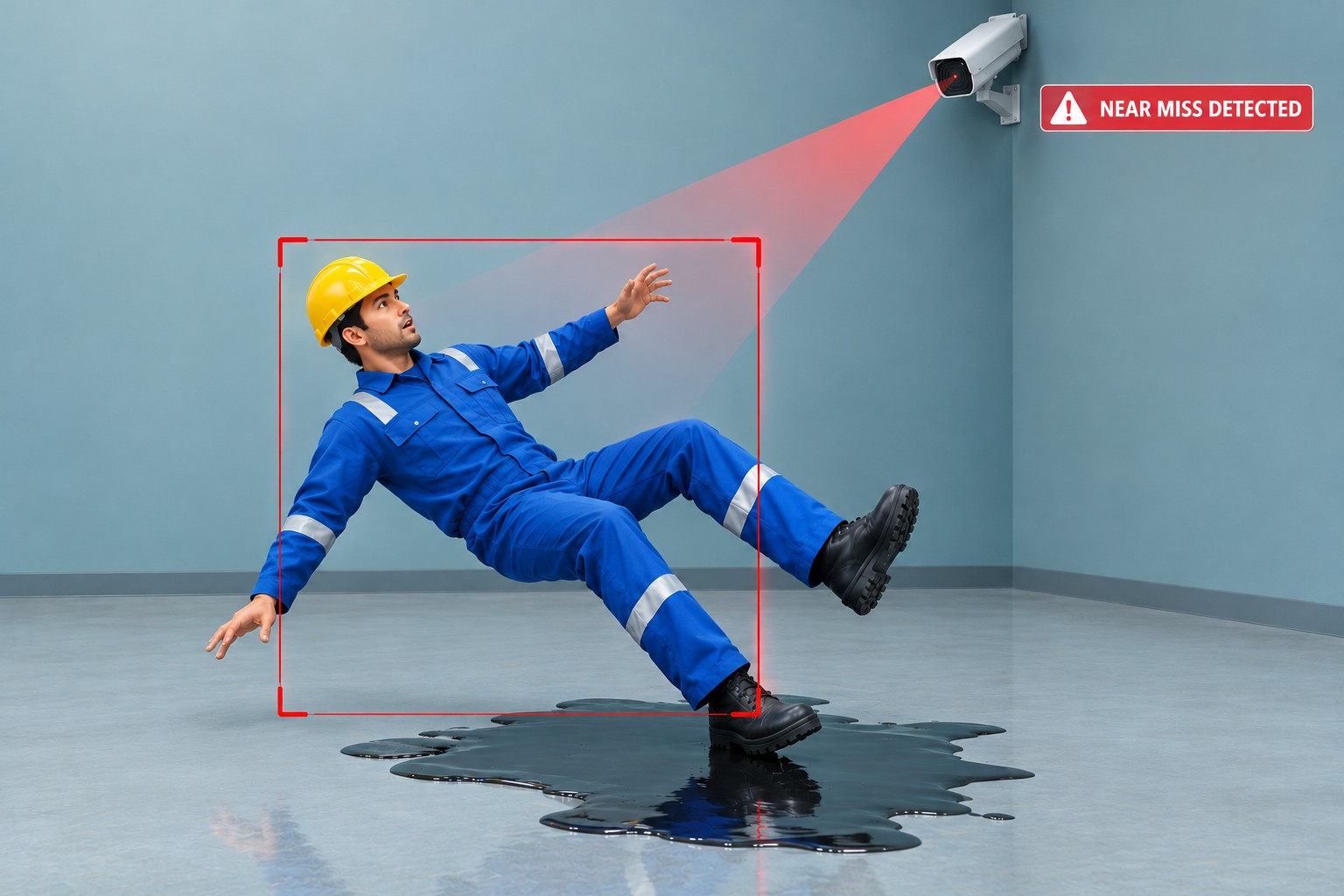
AI video analytics can flag predefined visual patterns that may indicate a near miss, such as a forklift approaching a pedestrian too closely or an object falling near a worker. Depending on system capability, a flagged event may include a video clip, timestamp, and camera location to support review and documentation. These descriptions reflect general capabilities of the technology. Actual detection scope depends on the specific system, its configuration, and the cameras installed in each work area.
A flagged event is only an indication, never a confirmed finding. Qualified personnel must review it before it is classified as a near miss.
Key Differences Between the Two Approaches
| Comparison point | Traditional near-miss reporting software | AI video analytics-based approach |
|---|---|---|
| Event identification | Usually initiated by a person | Potential events can be flagged automatically |
| Report initiation | A person submits the information | Detection may initiate a reporting workflow |
| Visual evidence | Added manually when available | Available footage may support verification |
| Unreported events | May remain undocumented | Potential events may be flagged without a submitted report |
| Verification | Review of submitted details | Review of alerts and available video evidence |
The two approaches complement one another. Employee reports capture what cameras cannot see, while video can flag what nobody reported.
How AI Video Analytics Improves Near Miss Reporting
1. Identifies Potential Near Misses Automatically
Configured analytics can flag predefined movement patterns and hazardous interactions, including forklift pedestrian close encounters, near collisions, and falling objects. This draws attention to events that might otherwise stay undocumented, which is the core of automated near miss identification and AI powered near miss detection. It also shows how AI helps detect potential workplace hazards that busy teams overlook. Results in near miss detection in manufacturing depend on camera coverage, configuration, and system performance. A blind corner without a camera produces no alerts, however capable the software. Likewise, rules tuned for a well lit packing hall may perform poorly near a dim dock door, so each area needs separate checking.
2. Captures Visual Evidence for Better Documentation
Footage can establish the sequence before, during, and after a potential near miss. It clarifies the positions and movements of people, vehicles, and objects, which helps reviewers assess reports and reduces reliance on incomplete descriptions. Timestamps and camera locations add context where available. Strong near miss video evidence improves near-miss event documentation, and it explains how video evidence supports near-miss investigations: reviewers can check a statement against what actually happened. Footage supports an investigation, but it may not reveal every contributing factor, such as fatigue, training gaps, or unclear procedures.
3. Reduces Delays in Identifying and Recording Events
Automated flagging can bring potential events to the attention of safety teams without waiting for a submitted report. Timely review lets personnel document events while relevant footage remains available and witnesses still remember details. Where system integration exists, a detection can start the reporting workflow. Real time reporting should not be assumed, because it depends on how the implementation is set up.
4. Identifies Repeated Near Miss Patterns
Verified events can reveal repeated close calls in the same work area, traffic route, shift, or operating condition. These patterns direct further investigation into visibility, material movement, pedestrian routes, or work procedures. Organised records give a stronger basis for hazard identification and workplace risk prevention than isolated reports. Over time, this supports risk management by showing which areas deserve investment first. Trends also support incident prevention decisions, such as redesigning a route or revising a loading procedure. A single close call may reflect an off day, whereas the same close call at the same junction every Monday morning points to a system weakness that deserves attention.
How AI Video Analytics Supports the Near Miss Reporting Process
Step 1: Monitor Configured Camera Footage
Selected CCTV or IP cameras cover relevant areas such as aisles, loading bays, and machine zones. This CCTV based safety monitoring only works where viewing angles, lighting, and clear sightlines allow reliable detection. Poorly placed cameras undermine every later step. Priority should go to areas where vehicles and pedestrians share space, where loads are lifted overhead, and where earlier reports already point to concern.
Step 2: Detect and Flag a Potential Near Miss
Configured detection rules flag potentially hazardous interactions, such as a vehicle entering a pedestrian zone. The alert is an indication that requires review, not a conclusion. Human judgement settles the question.
Step 3: Review the Video Evidence
Qualified EHS personnel review the footage, check the context, and decide whether the event qualifies as a near miss. Dismissed alerts should be noted, because they reveal configuration problems. Reviewers should examine footage from before and after the detected event to better understand the circumstances and actions involved. A driver who braked early and sounded the horn presents a very different picture from one who did neither.
Step 4: Document and Investigate the Event
Learning how to document near miss events starts with a complete record: date, time, location, event description, and supporting evidence, all held within the incident management process. A near miss investigation should weigh contributing factors, such as layout, workload, and procedures, rather than relying only on the video. Formal root cause analysis supports a sound safety investigation.
Step 5: Apply CAPA Where Required
Findings may lead to corrective and preventive action (CAPA) with assigned owners, deadlines, preventive measures, and verification of completion. Effective CAPA management and corrective action tracking close the loop only when completion is checked. Inspection management helps here by scheduling follow up inspections that confirm unsafe conditions were actually removed. Detection alone never closes an action. Where the same condition recurs after closure, the original action was probably too weak, and the CAPA record should be reopened rather than duplicated.
Practical Examples of AI Assisted Near Miss Reporting in Manufacturing
The following scenarios are hypothetical illustrations, not customer cases.
Forklift and Pedestrian Close Encounters
An alert flags a forklift passing close to a pedestrian at an aisle crossing. The safety team reviews the clip, confirms a near miss, and records it with the timestamp and camera location. Investigation then examines recurring conditions: whether the crossing is marked, whether mirrors or horns are used, and whether traffic peaks at shift changes. Without the alert, the event might never have reached a report. The corrective options may include physical segregation, speed limits, or revised pedestrian routes, each assigned to an owner with a date.
Falling Objects Near Workers
Footage flags a component dropping from a rack beside a worker. Review confirms the object landed close without contact. The record then supports investigation of storage height, pallet stability, and handling practices, and may lead to revised rack loading rules and a check of the racking itself.
Repeated Close Calls in the Same Work Area
Four verified events within a few weeks at one loading bay suggest a recurring concern. The team compares times, vehicles, and layouts, finds a common factor such as poor visibility at a corner, and introduces corrective measures such as convex mirrors or a revised traffic plan. Follow up review then shows whether alerts decline, which confirms whether the measure worked.
Conclusion
Near miss reporting gains from automated flagging, visual evidence, quicker identification, and recurring pattern analysis. Conventional reporting tools and video analytics play complementary roles. Employees report what cameras miss, and cameras flag what nobody reported. Human review remains essential to verify potential events, understand context, and identify contributing factors that footage cannot show. Where required, CAPA ensures that findings lead to assigned and verified action.
For manufacturing organisations, dependable results come from well configured cameras, clear review procedures, and disciplined follow up. Detection only helps when the records it creates lead to hazards being fixed. Organisations that pair clear review rules with accountable follow up are the ones likely to turn camera footage into lasting reductions in exposure, while those that stop at detection simply accumulate alerts. EHS4Safety encourages manufacturers to treat every close call as a lesson.